Body
Overview
This article explains how to set and change your BitLocker (Windows disk encryption) startup PIN/password. A PIN is required under U of I standards for all machines that likely process High Risk data.
Set Initial PIN
- You may be prompted to set a PIN on your machine if you don't have one. This will be a simple PIN prompt:

- Set an appropriate and complex PIN or password at least 8 characters. Next time your computer reboots, you will be prompted to enter this PIN.
- When traveling, you should power off your computer when possible. This provides maximum protection if the device is stolen.
Change your BitLocker PIN
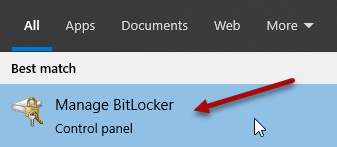
- Click on the Start button and start typing BitLocker. Click on Manage Bitlocker.
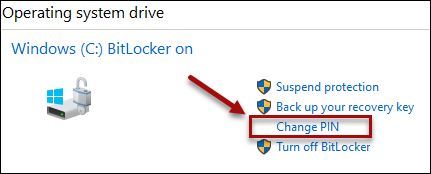
- Click on Change PIN.
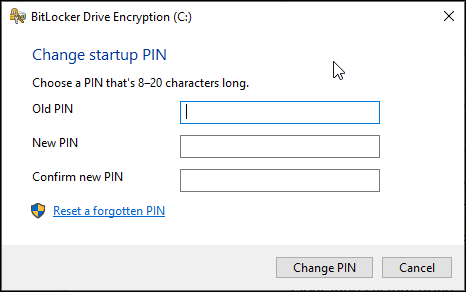
- Enter the Old PIN, enter a New Pin, Confirm the New Pin and click Change PIN. Your PIN must contain 8 – 20 letters and numbers (at least one of each) but it does not need Uppercase letters. Do not use any special characters.
- Click Close when done.